No view of who does what
The manager learns task status in meetings and chats, not from a screen.
Solution · Team oversight
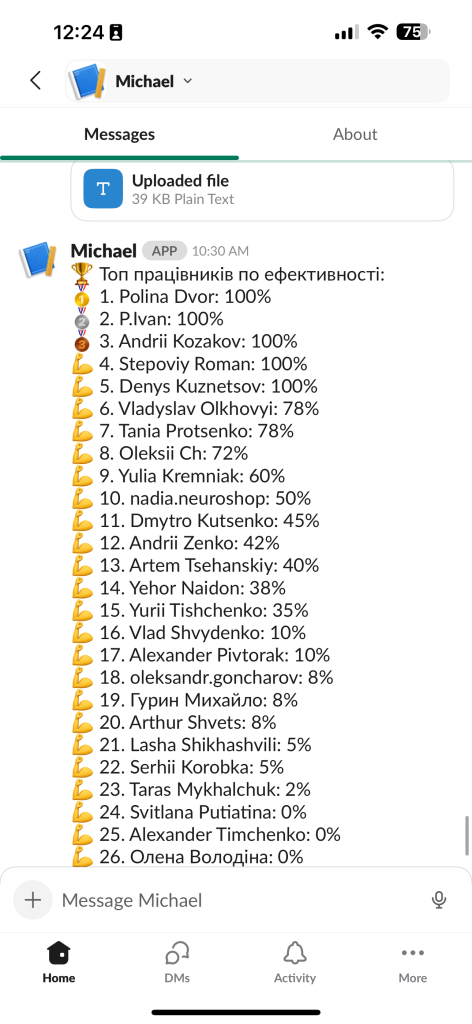
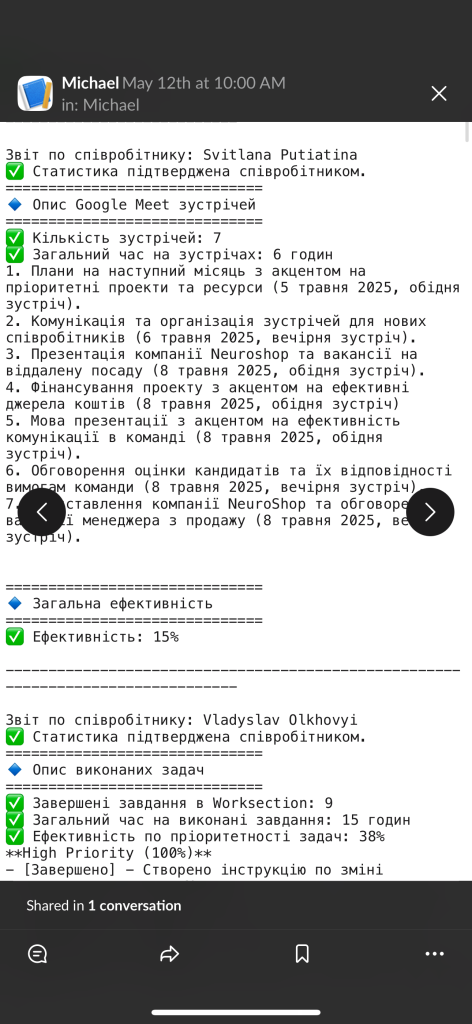
The solution shows a manager who works on what, how projects move and where the team is overloaded. Data comes from your task trackers, and reports build themselves. In our case, manager workload fell by up to 50%.
When a team is large or remote, it is hard for a manager to keep track of who is doing what and where tasks are stuck. Status updates come from meetings and chat threads, reports are compiled by hand, and by the time the picture is ready, it is stale. So the manager spends time on oversight instead of decisions. AI employee performance monitoring removes that routine. The solution pulls data from your task trackers, shows project progress and workload by person and team, and builds reports for the manager on its own. Think of it as an assistant for managing people: you see what is done, what is in progress and where you need to step in. It fits IT and project teams, agencies, service businesses, remote teams, and the leads and managers who run them. At Neuroshop, this productivity tracking system cut manager workload by up to 50% and time spent analyzing team performance by 70%.
The problem
The manager learns task status in meetings and chats, not from a screen.
Summaries for every employee and project eat up hours each week.
It is hard to say what will ship on time and what is already slipping.
Instead of making decisions, the lead spends time collecting updates.
What you'll get
See what is done, what is in progress and what is stuck.
Summaries by person, team and project build themselves.
It is clear who is overloaded and who has capacity.
Pulled from your systems, not from manual spreadsheets.
Alerts about due dates and open tasks.
What's included
We figure out what matters for the manager to see.
Data collection from your task trackers.
Task and project status on a single screen.
Summaries by person and team for your goals.
Alerts about deadlines and open tasks.
Managers see summaries, employees see their own data.
Industries
Productivity tracking for an IT team with data from Slack, Worksection and Jira, as in the case where analysis time fell by 70%.
See how specialists are loaded across several clients and projects at once.
Completed tasks and staff productivity rolled up into summary reports.
Progress and workload of remote staff are visible without constant check-in calls.
A live picture of the team instead of waiting for the end-of-week report.
Performance monitoring is not about watching someone’s screen. It is about the manager seeing the team’s work at the level of tasks and projects. The data comes from systems the team already uses, so nobody has to fill in anything extra.
One screen shows which tasks are done, which are in progress and which are overdue, how projects are tracking against the deadline and how evenly work is spread. If one person is overloaded while another has capacity, you notice it right away and can rebalance in time.
Reports by person, team and project build themselves, and reminders flag upcoming deadlines. The manager spends time on decisions, not on collecting status: in the team oversight case, time spent analyzing performance fell by 70%.
Done, in progress, overdue: all on one screen.
Movement toward the deadline, not just single tasks.
Who is overloaded and who has room.
Summaries by person and team with no manual work.
How we implement it
We work out what the manager needs to see about the team.
We pull data from your task trackers and services.
We build summaries and alerts around your goals.
The manager sees progress and workload with no manual roll-ups.
Results
up to 50% — less manager workload
Case study: Neuroshop−70% — time spent analyzing team performance
Case study: NeuroshopPricing
Final cost depends on scope and integrations. We'll give exact pricing and timelines after a free consultation.
Why us
In the team oversight case, it dropped by up to 50%.
In the same case, time spent analyzing team performance fell by 70%.
In the project, data came from Slack, Worksection and Jira.
Data is visible only to the people it is meant for.
FAQ
The solution pulls data from your task trackers, shows the manager task progress and workload by person and team, and builds reports automatically. In the team oversight case, this cut manager workload by up to 50% and analysis time by 70%.
The solution shows work metrics (task status, project progress, workload), not personal messages or an employee’s screen. The goal is to see where the team needs help or a rebalance, not to police every step. Access is split by role.
From your task trackers and services. In the team performance case, data came from Slack, Worksection and Jira. Other systems connect through an API, a direct channel for software to exchange data.
Onboarding is about training and settling in new employees. Analytics and reporting is about business intelligence built on accounting data. This page is about day-to-day control of tasks and team productivity for the manager.
Access is set up by role: managers see team summaries, and employees see their own data.
Implementation starts at $2,000 and support at $150/mo. The final price depends on the number of systems, the volume of data and how complex the reports are. Leave a request and we will prepare an estimate for your team.
Roughly 4–8 weeks from kickoff to a working solution. The exact timeline depends on the number of data sources and integrations.
AI employee performance monitoring means data about your team’s work is collected from your systems automatically, and the manager sees task progress, workload and ready-made reports without compiling anything by hand. It also goes by AI performance tracking, employee productivity monitoring or an AI productivity tracker. Instead of asking for status in meetings, the manager opens one view: what is done, what is in progress and what is stuck. It works in a few steps. First we define which metrics matter to the manager. Next we connect your task trackers and services and pull data from them. Then we set up automatic reports by person, team and project, deadline reminders and role-based access. After launch, the picture updates in real time. At Neuroshop, this solution cut manager workload by up to 50% and time spent analyzing team performance by 70%; data came from Slack, Worksection and Jira, among others. Monitoring is about day-to-day task and progress control. For training and onboarding new hires, see our AI employee onboarding page; for business reporting built on accounting data, see Analytics and reporting.
Related pages:
Case: team performance monitoring
Other solutions
Free consultation
In the consultation we'll walk through your process, show similar rollouts, and give you pricing and timelines. The first consultation is free.
What you'll get from the consultation
We use cookies for analytics and advertising to understand how the site is used. You can accept or decline them; details are in our privacy policy.